

What is Claude Cowork?
Claude Cowork is a browser-based workspace where you can upload files and chat with Claude about your project. Unlike the standard Claude chat:- ✅ Upload custom binaries and run them
- ✅ Work with multiple files simultaneously
- ✅ Access a full sandboxed environment
- ✅ No local setup required
Why Use tk with Claude Cowork?
Quick Triage
Ask Claude to run
tk triage and get AI recommendations without leaving the browserIssue Management
Create, update, and close issues through natural language
Dependency Analysis
Visualize issue dependencies and critical paths
No Local Install
Use tk from any device without installing anything
Setup Instructions
Step 1: Download the tk Binary
Download the Linux ARM64 binary (Claude Cowork runs on ARM64 architecture):
This will download the tk-linux-aarch64 binary to your downloads folder.
Or download directly from the install page.
Step 2: Upload the Binary to Claude Cowork
- Go to claude.ai/cowork
- Click the “Add Files” button in the sidebar

- Select the
tkbinary you downloaded - Wait for the upload to complete

Step 3: Make the Binary Executable
Once uploaded, ask Claude to make it executable: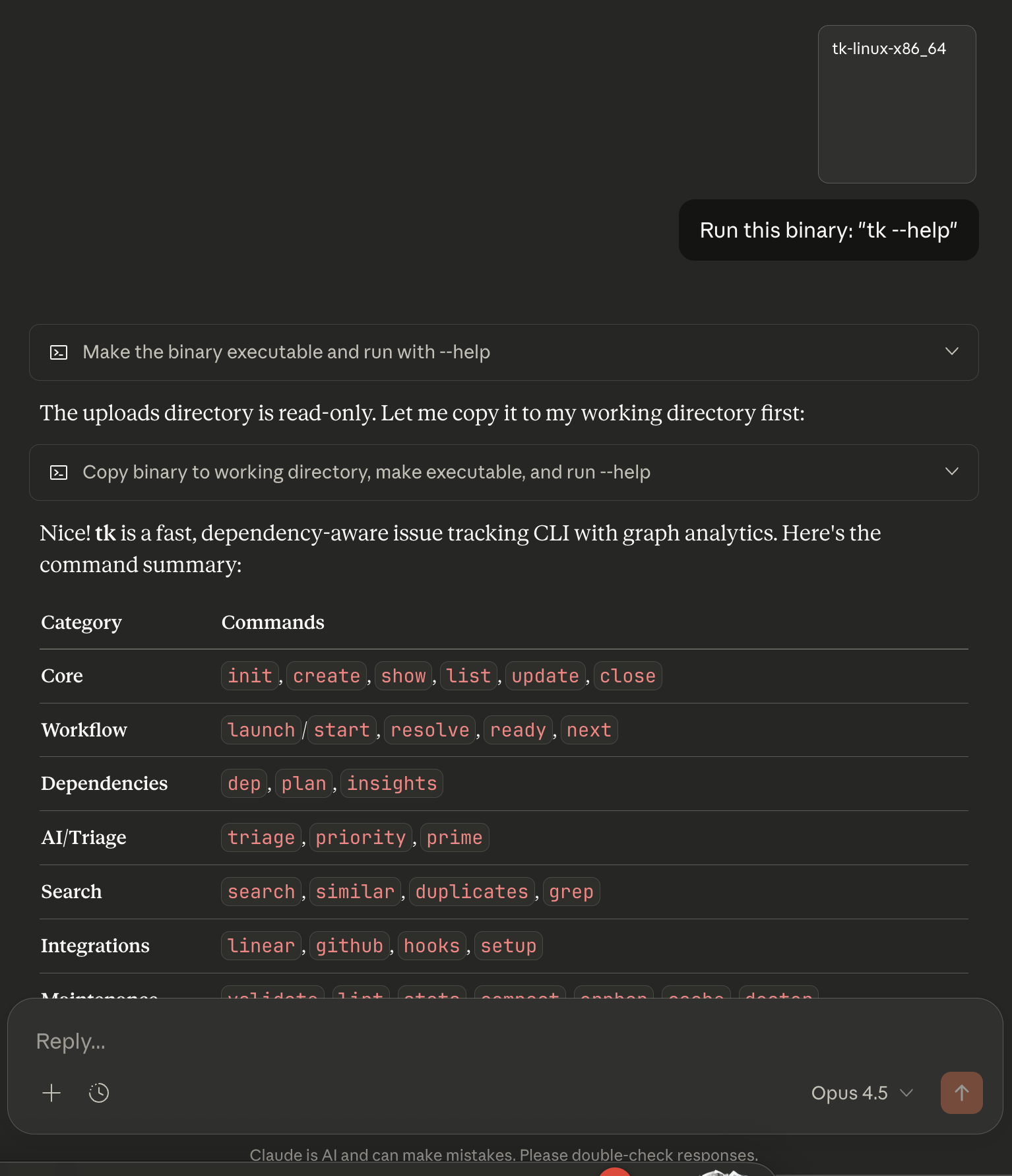
If you see the version output, tk is ready to use!
Step 4: Upload Your .tickets/ Directory
Upload your project’s .tickets/ directory so Claude can analyze your issues:
- Zip your
.tickets/folder locally:
- Upload
tickets.zipto Claude Cowork - Ask Claude to extract it:

Usage Examples
Now you can ask Claude to run tk commands naturally:Get AI-powered triage recommendations
Get AI-powered triage recommendations
You: “Run tk triage and tell me what I should work on”Claude: Runs
./tk triage and interprets the results, explaining the top recommendations and why they matter.Create a new issue
Create a new issue
You: “Create a new issue for adding OAuth authentication, priority 1, type feature”Claude: Runs
./tk create "Add OAuth authentication" -p 1 -t feature and confirms the new issue ID.Check what's ready to work on
Check what's ready to work on
You: “What issues are ready to work on right now?”Claude: Runs
./tk ready and shows you all unblocked issues.Visualize dependencies
Visualize dependencies
You: “Show me the dependency tree for tk-abc123”Claude: Runs
./tk dep tree tk-abc123 and explains the relationships.Analyze project health
Analyze project health
You: “How healthy is this project? Any bottlenecks?”Claude: Runs
./tk insights and explains PageRank, betweenness centrality, and critical path findings.Best Practices
1
Upload fresh .tickets/ regularly
Re-upload your
.tickets/ directory whenever you make significant changes to keep Claude’s context current.2
Use natural language
You don’t need to memorize tk commands. Just ask Claude what you want, and it will figure out the right command.
3
Ask for explanations
Claude can interpret tk’s graph analytics output and explain what it means for your project.
4
Combine with MCP
For even better results, also install the tk MCP server in your local Claude Code setup.
Limitations
Claude Cowork is best for quick triage, analysis, and planning — not as a replacement for your local tk setup.
Troubleshooting
tk command not found
tk command not found
Make sure you ran
chmod +x tk to make the binary executable. Ask Claude: “Make the tk binary executable.”Wrong architecture error
Wrong architecture error
Claude Cowork uses Linux ARM64. Download the correct binary:
No .tickets/ directory found
No .tickets/ directory found
Make sure you extracted the
tickets.zip file. Ask Claude: “Extract tickets.zip.”Permission denied
Permission denied
The binary might not be executable. Run:
Next Steps
CLI Commands
Full command reference for working with issues
MCP Server
Give Claude direct access to tk via MCP
Claude Code
Set up tk locally with Claude Code
Graph Analytics
Learn how tk’s AI-powered analytics work