


tk) is a fast, dependency-aware issue tracker designed for AI-native workflows. Issues are stored as Markdown files with YAML frontmatter in .tickets/, making them versionable, greppable, and diff-friendly.
How It Works
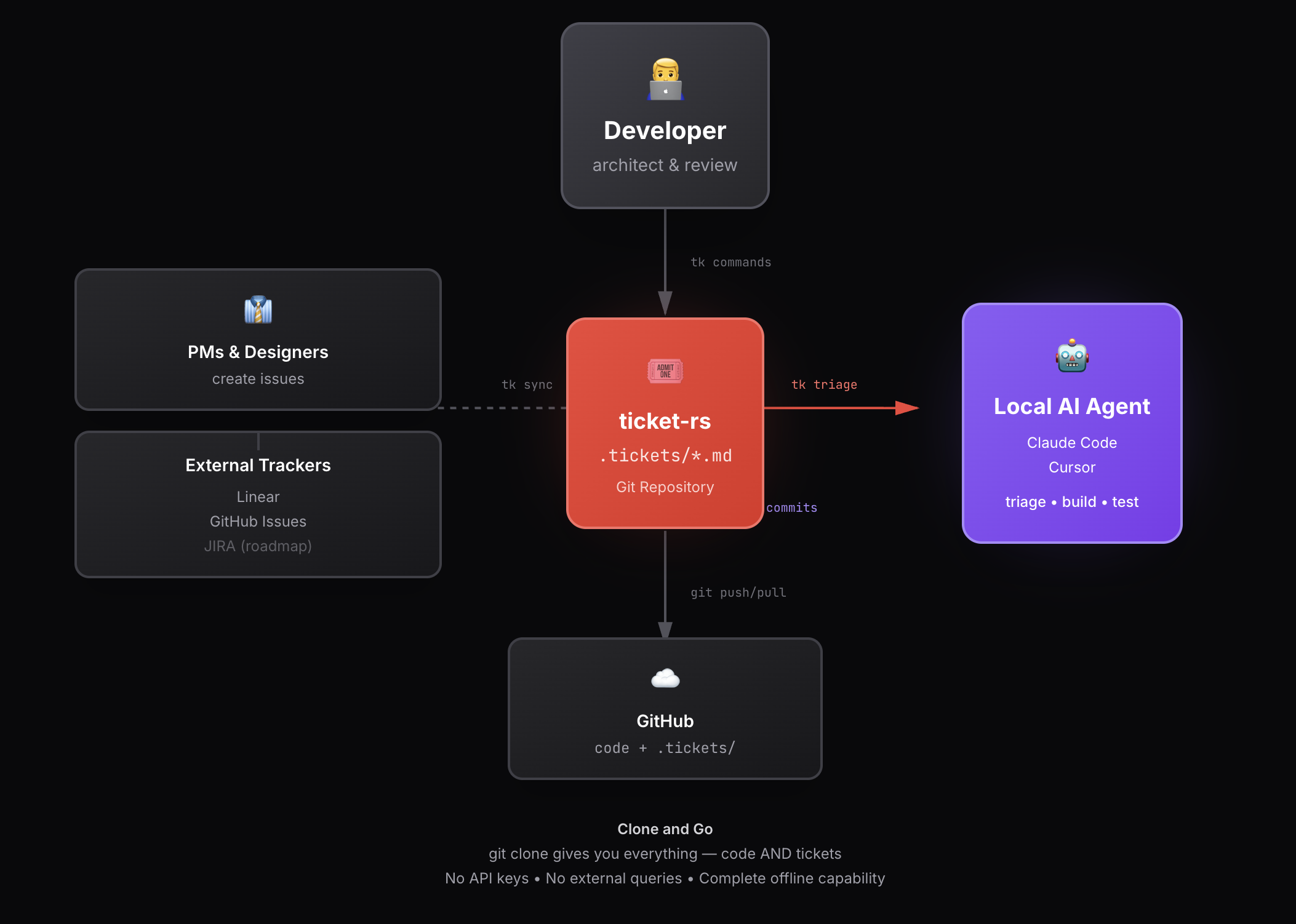
- Clone and Go:
git clonegives you everything — code AND tickets. No API keys, no external queries. The complete project state is in the repo. - Local Agents: Each developer has their own local AI agent (Claude Code, Cursor) working directly with their cloned repo. Run
tk triage, build, test, and commit — all locally. - External Sync: PMs create issues in Linear/GitHub/JIRA.
tk synckeeps external trackers and local.tickets/*.mdfiles in sync bidirectionally. - Git Workflow: Push commits (code + ticket updates) to GitHub. Other team members pull and get the latest state automatically.
- Status Updates: Close issues locally (via AI or human). Status syncs back to external trackers automatically.
Git-Backed
Issues live in your repo as Markdown files. No external database, no sync conflicts.
Dependency-Aware
Track blocking relationships. PageRank surfaces what matters most.
AI-Native
Built for AI agents with
tk prime, tk triage, and MCP integration.Zero Daemons
No background processes. Just a single binary that works instantly.
Quick Example
Issue File Format
Issues are Markdown files in.tickets/ with YAML frontmatter:
Key Features
Graph Analytics
tk uses graph algorithms to help you prioritize:- PageRank — Issues that unblock the most work bubble up
- Critical Path — Find the longest dependency chain
- Betweenness Centrality — Identify bottleneck issues
- Stacks — Detect linear dependency chains for coordinated development
Learn about Concepts
Dive into dependencies, stacks, and graph analytics.
AI Agent Integration
Designed for Claude Code, Cursor, and other AI assistants:tk prime— Inject workflow context at session starttk triage— Unified recommendations, quick wins, blockerstk next— Single top recommendation for quick decisions
External Sync
Bidirectional sync with your existing tools:- GitHub Issues —
tk github sync - Linear —
tk linear sync
Next Steps
Quickstart
Install tk and create your first issue in 60 seconds.
CLI Reference
Complete command documentation.
Claude Code Setup
Configure tk with Claude Code hooks.
GitHub Sync
Sync issues with GitHub Issues.