

Claude Code Options
Claude Code is available in multiple forms:Claude CLI
Terminal-only interface installed locally. Most common for developers.
Desktop App
Downloaded app with Claude Code feature. Can run locally or in remote sandbox.
Web Version
Browser-based at claude.ai/code. Remote sandbox environment.
.tickets/ directory via git, so issues created in one are immediately available in others.
Recommended Setup
Set up locally first with Claude CLI, then use Desktop/Web when needed.Step 1: Install Claude CLI
Most developers use Claude CLI exclusively in the terminal:claude command for terminal-based AI assistance.
Step 2: Install tk and Configure
Restart your terminal or run
source ~/.bashrc (or ~/.zshrc) for changes to take effect.Step 3 (Optional): Desktop App or Web
Desktop App (GUI with Claude Code feature):- Download from claude.com/download
- Navigate to Claude Code
- Choose local mode (uses SessionStart hook) or remote sandbox
- In local mode, tk commands work immediately
- Visit claude.ai/code
- Create session from GitHub repo
- Configure allowed domains (first-time only):
- Add
ticket-rs.ioto allowed domains - See Allowed Domains section below
- Add
- Install tk:
curl -fsSL https://ticket-rs.io/install.sh | sh - Verify:
tk ready
.tickets/ directory from git.
Claude CLI Setup (Terminal)
Most developers use Claude CLI exclusively in the terminal. It runs locally with full access to your development environment.How SessionStart Hooks Work
Thetk setup claude command adds tk prime to your SessionStart hook:
Manual Hook Configuration
Add to.claude/settings.local.json:
- SessionStart:
tk primeinjects issue context;tk claude sync --pushpushes open issues as native Claude Code tasks (visible viaCtrl+T) - PostToolUse(TaskUpdate): When Claude updates a task status, the change syncs back to tk
- PostToolUse(TaskCreate): When Claude creates a new task, it becomes a tk issue
- PostToolUse(Bash): When
tk close,tk resolve,tk claim, ortk startruns, the status change pushes to Claude tasks - Stop: A prompt-based hook that nudges the agent to reconcile completed/discovered work with tk before stopping
- SessionEnd: Prints remaining ready work (
tk ready) as the session closes
CLI Advantages
Terminal-First
Perfect for developers who live in the terminal
SessionStart Hooks
Automatic context injection on every session
Local Performance
No network latency, instant command execution
Full Git Access
Direct access to git history and repository
Desktop App & Web Setup
The Desktop App and Web version can run in remote sandbox environments. Install tk in each session.Desktop App
- Download from claude.com/download
- Navigate to Claude Code feature
- Choose local or remote sandbox mode
- SessionStart hooks work automatically for local mode
Web Version
Visit claude.ai/code and create a session from your GitHub repo. Install tk in session: Ask Claude:Remote Sandbox Advantages
Any Device
Access from laptop, tablet, or phone browser
No Local Install
Works without installing anything locally
GitHub Integration
Seamless repo cloning and sync
Quick Triage
Review issues and run tk commands anywhere
Workflow Example
- Main development: Claude CLI in terminal with SessionStart hook
- Remote triage: Desktop/Web to review
tk triageand prioritize work - Sync via git: Changes committed in any version appear in all others
What tk prime Does
When Claude starts a session, tk prime outputs:
- Project summary — Issue counts by status
- Ready work — Issues with no blockers
- In-progress work — What’s currently being worked on
- Top priorities — PageRank-sorted recommendations
- Stacks — Linear dependency chains for coordinated work
- Quick reference — Common commands
Manual Configuration
If you prefer to configure manually, use the same hook configuration shown in Manual Hook Configuration above, saved to.claude/settings.local.json.
Or install globally in ~/.claude/settings.json:
AGENTS.md Setup
Add a minimal pointer to yourAGENTS.md (or CLAUDE.md):
Working with Claude
Once configured, Claude can help you:Find Work to Do
Ask Claude: “What should I work on next?” Claude will usetk ready and tk triage to recommend the highest-impact work.
Create Issues
Ask Claude: “Create an issue for adding dark mode support” Claude will run:Manage Dependencies
Ask Claude: “The auth feature blocks the dashboard, add that dependency” Claude will run:Close Issues
Ask Claude: “I finished the login bug, close it” Claude will run:Work with Stacks
Ask Claude: “Show me the stacks in this project” Claude will run:Task Sync with Claude Code
New in v0.0.1: Bidirectional sync between tk issues and Claude Code’s task system.
TaskCreate, TaskUpdate, etc.). The tk claude sync command enables bidirectional synchronization between tk issues and Claude tasks, allowing you to:
- See tk issues in Claude’s task UI - Issues appear as native tasks in Claude Code
- Track progress in both systems - Status changes sync automatically
- Work seamlessly - Use whichever interface you prefer
Enable Task Sync
How It Works
- Auto-Detection: Automatically finds your current Claude Code session from
~/.claude/tasks/ - Bidirectional Mapping: Maintains
claude_task_idfield in tk issues to track sync state - Status Mapping:
pending↔openin_progress↔in_progresscompleted↔closed
- Smart Sync: Only syncs issues matching the specified state filter (default:
open)
Sync Workflow
Typical workflow when working with Claude:When to Use Task Sync
Use task sync when:- You want tk issues visible in Claude’s native task UI
- Claude agents need to programmatically manage tasks via TaskCreate/TaskUpdate tools
- You’re tracking work across multiple Claude sessions
- You only use
tkcommands in Claude (via hooks and bash) - You don’t need Claude’s task UI
- Your workflow is purely CLI-based
Troubleshooting Task Sync
No Claude session found
No Claude session found
Make sure you’ve started Claude Code at least once. The sync command looks for session data in
~/.claude/tasks/.Tasks not appearing in Claude
Tasks not appearing in Claude
- Verify sync succeeded:
tk claude status - Refresh Claude Code interface
- Check that issues have
claude_task_idfield:tk show <issue-id>
Sync conflicts
Sync conflicts
If both systems have conflicting changes, tk preserves local state and logs warnings. Re-run sync to resolve:
Remove Integration
To remove the Claude hooks:Allowed Domains
When using Claude Code Web or Desktop in remote sandbox mode, you may need to configureticket-rs.io as an allowed domain to download the tk installation script.
How to Add Allowed Domains
- Open Claude Code settings (gear icon)
- Navigate to Code Execution → Allowed Domains
- Add
ticket-rs.ioto the list - Save settings
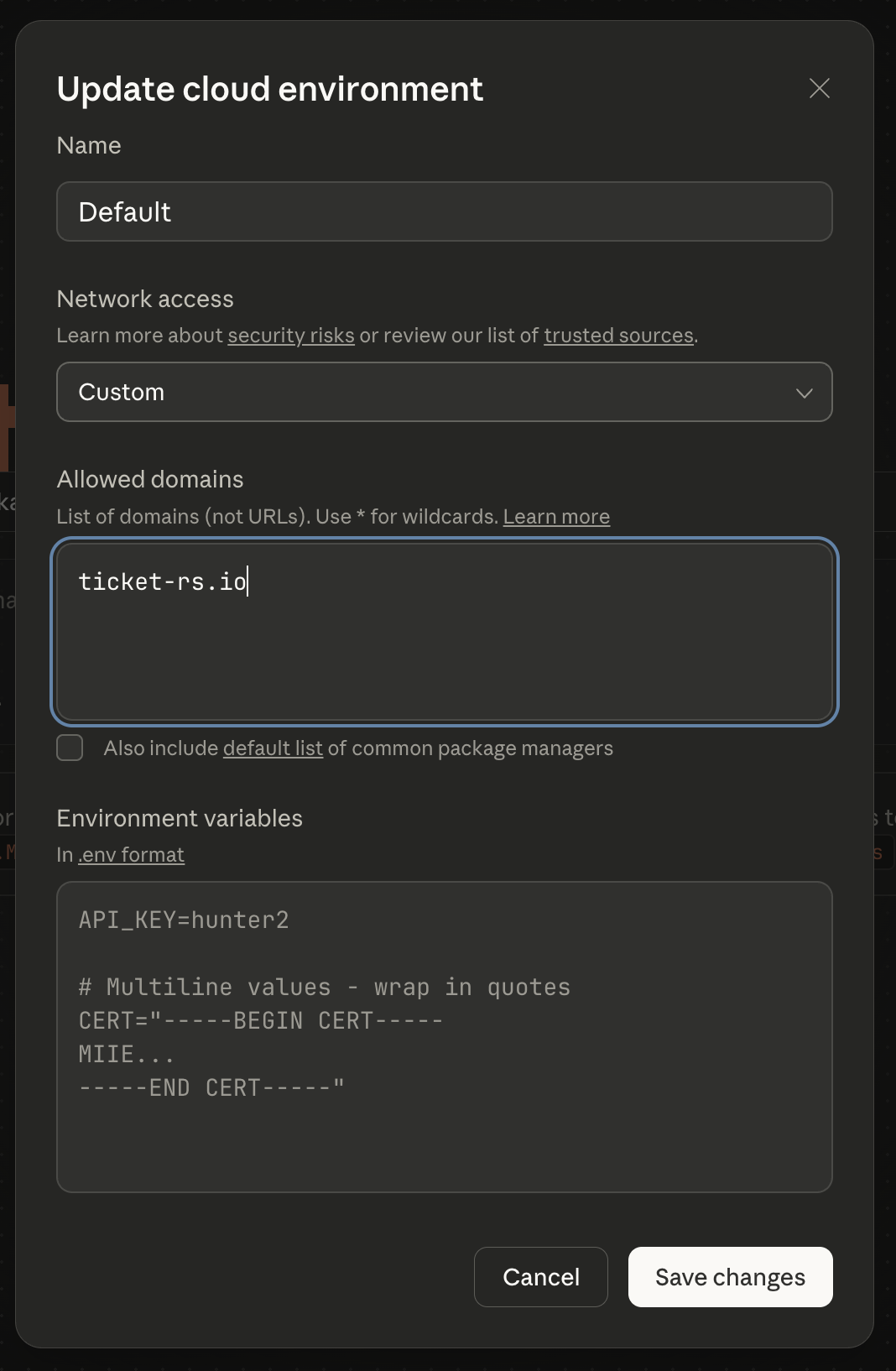
This is only required for remote sandbox sessions. Local CLI installations don’t need this configuration.
Troubleshooting
tk prime not running at session start
tk prime not running at session start
- Verify hooks are installed: Check
.claude/settings.local.json - Restart Claude Code completely
- Re-run
tk setup claude
No issues showing up
No issues showing up
Make sure you’re in a directory with a
.tickets/ folder, or a subdirectory of one.Installation fails with 'Domain not allowed'
Installation fails with 'Domain not allowed'
Add
ticket-rs.io to allowed domains in Claude Code settings. See Allowed Domains section above.Want global installation
Want global installation
Use
--global to install for all projects:Next Steps
Stacks
Understanding linear dependency chains.
CLI Commands
Full command reference for working with issues.
Graph Analytics
PageRank, critical path, and bottleneck detection.
MCP Server
Give Claude direct access to tk documentation.